

Publish an application round (AO)
It is you, as the web editor at vinnova.se, who takes the final step for an application round (AO) to become visible on vinnova.se.
Publicera AO-sida
Anyone in the web editors can publish AO pages. We publish a page when we receive it in the web drawer. All conversation takes place via the web drawer.
- Check that the announcement page itself, i.e. the parent page for the AO, is published in both Swedish and English. Publish the announcement page.
- Check if the title, introduction and trefoil are understandable on the AO page. If not, email programme manager and check that they have received approval from KP. We are mandated not to publish if the text is incomprehensible.
- Go to the Puff tab and add a title, text and image. Note that if there is a puff image inserted on the call page above the AO page in the structure, this image will be inherited down to the AO page's puff. However, this image will be overwritten if you insert a specific puff image on the AO page.
- Go to the SEO tab and add a title, text and image. Note that any SEO image on the call page above the AO page in the structure will not be automatically inherited to the AO page's SEO image in the same way that the puff image is inherited.
- If you are missing a picture, email the client and ask for one. It is often KP who produces the picture.
- Go to the AO tab and drag the Subscribe to newsletters and our social channels page into the puff area at the bottom. Remove the heading Similar offers above the puff area.
- Translate the page.
- Go to the English page. Remove the heading Similar offer under the AO tab.
- Publish the English page
- Email the client that the call for proposals has been published and attach both links for verification. Tell them to come back when the call text is ready for webification.
Who does what?
Effekta - ALL content for the AO is added to Effekta.
Responsible: Programme manager, Administrator
Open data - Editors for vinnova.se are not allowed to post content on an AO page. If we do this, the same content must also be published from Effekta and displayed as open data.
vinnova.se - On call pages, the editor may only add Important dates. The editor can also change the order of the contacts in the Contact Block - read more under the heading: Sort contact persons on the page at the link.
Responsible:Web editorial team
Troubleshooting
AO page not found in Epi
A missing page can be caused by three things:
- It is not published in effekta yet. Email programme manager and ask.
- It hasn't arrived yet. It will take 4 hours before it arrives on the web.
- It has been removed automatically. If an advertised AO is not decided and published in Effekta before the last day of the month it is to open, it will be unpublished and removed from Open data. When it is then decided and published in Effekta, the web editor must go in manually and republish the page manually. Call manager always receives a reminder from Effekta that the AO needs to be decided in order for depublication to not occur.
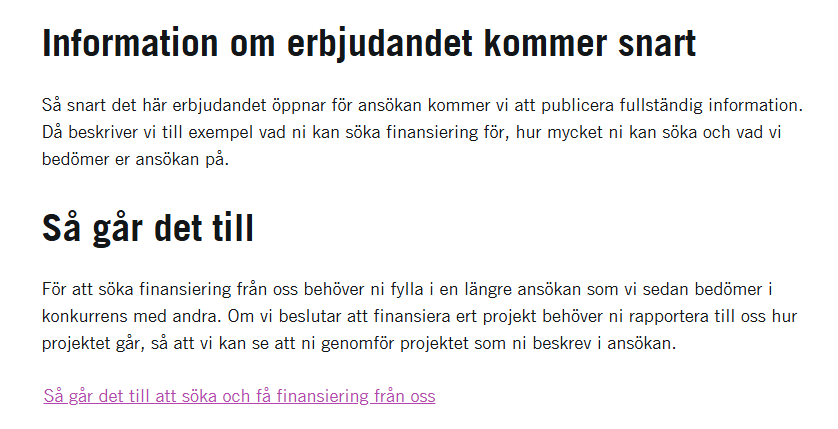
The text "Information about the offer coming soon" remains
If the text, see image, is displayed on the AO even though the web-based call text is displayed, ask the administrator to go into Effekta and select Publ and Utl-text under the tab Web doc.
Other functions and tools around AO
Last updated 22 January 2026